
Software
Bruker Topspin:
Bruker Topspin for 1D and 2D NMR Processing
(individual unrestricted license on and off campus)
Mestrelabs MNova NMR:
Mestrelabs MNova - a full version with NMR Predict and Structure Elucidation modules
(restricted license: only on campus eduroam or via VPN)
MNova license server status
Bruker Topspin for 1D and 2D NMR data processing
In order to provide students, researchers and teachers with unlimited access to the best tools for off-line NMR processing, Bruker is making their market leading NMR processing software TopSpin available free of charge for all academic users. In addition to Bruker NMR data, the software is able to process data acquired on Agilent, Varian and JEOL systems, as well as read any data provided in JCAMP format. We are happy to offer you a free Academia license for TopSpin 4 and TopSpin 3.6 ("Academia license").
Notre Dame Topspin instructions
On campus access only:
- Download Topspin:
- Install Topspin, Select "Data Processing Station" and accept all defaults especially the Codemeter client/server.
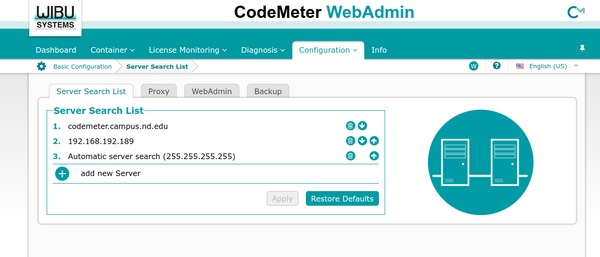
- Before opening Topspin, we need to modify where Codemeter searches for licenses. Open a web browser and navigate to 127.0.0.1:22350/configuration/server_search_list.html. Click the plus (+) sign to add a new server, and enter 2 additional servers:
- codemeter.campus.nd.edu
- codemeter2.campus.nd.edu
- Then click Apply.
Now when you run Topspin it should automatically connect to our license server (codemeter.campus.nd.edu) and pull a license. This will only work on campus or if you are connected to the VPN. For off campus use see the instructions below.
Off campus access:
-
Visit https://www.bruker.com/about-us/register.html to create an account with Bruker.
-
Download Topspin 3.6.4 either from our BOX share here, or directly from Bruker here.
- Topspin 4 is available, but it looks completely different than Topspin 3.6 or anything installed on the spectrometers. You can install both versions if you wish, they will use the same license file.
- Request a Free Academia license ticket here. Copy this ticket code somewhere safe.
- Install the new version of Topspin like normal.
- Open Topspin, it will complain there is no license file. After a short timeout period of about 2 minutes it should open a window where you will be able to click "Install License Ticket". Paste your License Ticket when prompted.
- It will open a web browser displaying available licenses, click the button that says "Activate Licenses"
- Select how you want to save your license, either on this Workstation only or to a USB dongle. I recommend saving it to the workstation. I have not tried the USB dongle option.
- Again select your license and push the button labeled "Activate Selected Licenses Now"
- Happy NMR'ing!
Mestrelabs MNova: a full version with NMR Predict and Structure Elucidation modules
(on campus or through VPN only)
Our annual subscription includes:
- a few licenses for full MNova NMR (includes full-featured 1D and 2D NMR processing, qNMR and Reaction Monitoring plugins),
- one license for NMR Predict plugin for prediction of chemical shifts from structure.
These licenses are only available while on campus or through VPN.
IMPORTANT! Read this before you start using the full version of MNova
Number of licenses for the full MNova version is very limited When you open an NMR spectrum in MNova, it begins using an "NMR" license from a license server. These licenses are very expensive, therefore, we only have a few of them for all users of ND campus. Please, remember to close MNova as soon as you are finished with NMR analysis to release your license for other users.
NMR Predict is only a single copy The plugin for prediction of NMR chemical shifts, NMR Predict, is licensed only as a single copy for the entire ND campus. As soon as you click "Predict" on MNova Prediction toolbar, the "NMR Predict" license is locked to your MNova. It will be released only after you close your MNova. Therefore, as soon as you finished with prediction of chemical shifts, please, exit and re-launch MNova to release the "NMR Predict" license.
Installation
- Download MNova from here (Windows/Mac/Linux)
- Please download our 2026 license files here. They come as a ZIP archive.
- Unzip the file if it has not been automatically unzipped upon download. License files all have '.lic' extension.
- Launch MNova. Drag-and-drop .lic files into MNova window.
- NOTE: To use NMR Predictor, for each nucleus you want to predict spectra of, you have to
- click on a corresponding prediction setup button (see image)
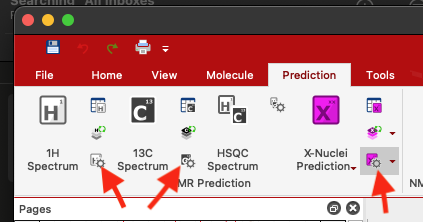
- This will envoke a dialog box with selection of predictors. Select "GCNN Predictor".
- Click <<More button to select spectrometer field strength.
- Now you can click on a molecular structure in MNova and predict a spectrum for this nucleus
- click on a corresponding prediction setup button (see image)